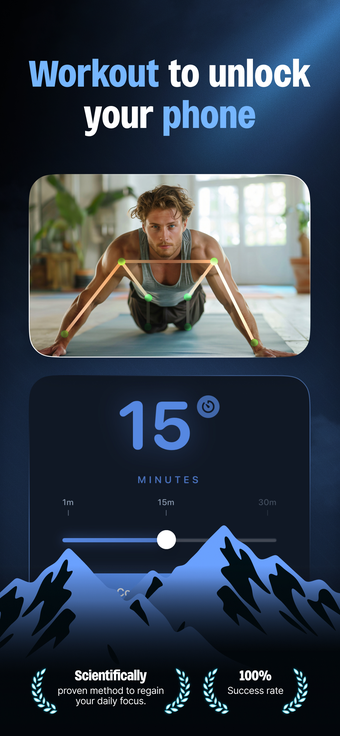
ScrollFit - PushUp App Blocker, from Raukin LLC, converts brief exercise into an access requirement to reduce distracted phone use. The app gates chosen applications behind short pushup sequences and verifies completion before unlocking, enforcing an active pause before browsing. Key elements include motion verification, customizable app blocking, rep counting, and usage history. It targets students, professionals, and anyone seeking to replace impulsive scrolling with deliberate work and short fitness breaks.
What professional interruptions does ScrollFit address?
ScrollFit targets work and study routines where impulsive app use fragments attention, turning a single tap into a deliberate decision. Because the tool places a physical barrier before access, it fits workflows that benefit from enforced microbreaks between tasks, such as timed study sessions or short meeting buffers. The app's progress history also provides a way to quantify reduced screen time alongside brief bursts of activity for habit tracking.
How does the app handle verification and privacy concerns?
The app uses the device camera and on-device AI to verify repetitions, which provides real-time rep counting while keeping processing local on the phone. That local processing means images and motion analysis do not need external servers for detection, a key privacy point for camera-based verification. The verification approach is explicit rather than pass/fail, so users see counted reps as the unlocking condition.
Is ScrollFit practical within a professional day?
The concept, labelled a Physical Tax, intentionally raises the barrier to impulsive use, which helps reduce short attention shifts but adds friction when uninterrupted stretches are required. Teams or individuals who schedule short breaks can integrate the app as a discipline tool, while those who need long, uninterrupted deep-work blocks may find the enforced interruptions counterproductive to certain tasks.
What are compatibility, requirements, and reception like?
ScrollFit requires a recent mobile environment to enable advanced on-device motion detection and ties into system usage controls. Key compatibility notes include:
Integration with the device's Screen Time controls for app management
Requirement of the modern OS level for AI camera features
User reception notes it as a novel, challenging approach that many find effective for curbing impulsive scrolling.
Who should use ScrollFit and where it falls short
ScrollFit suits students and professionals who accept brief physical interruptions as a discipline mechanism and who want simple habit data rather than extensive analytics. It is not ideal for roles requiring long, uninterrupted concentration because the activity requirement intentionally halts access. For those seeking a behaviorally strict nudge tied to physical activity, it performs as designed, though it trades uninterrupted time for momentary movement.
Pros
Physical-tax model discourages impulsive app openings through exercise
On-device AI processing keeps camera data local for privacy
Integrates with system Screen Time controls for app management
Progress history tracks both fitness reps and reduced screen time
Cons
Requires a modern OS level on iPhone to enable AI camera features
Exercise-based gating can interrupt long, focused work sessions
Camera-based verification may deter users uncomfortable with any camera use
Laws concerning the use of this software vary from country to country. We do not encourage or condone the use of this program if it is in violation of these laws. Softonic may receive a referral fee if you click or buy any of the products featured here.